Finviz

Powerful stock screener with market heat maps, fundamentals, technical filters, and real-time quotes on the Elite plan.

★★★★★ 4.5/5
stocksfuturesforexcryptobonds

Quick Facts

Starting Price
Free
Free Tier
Yes
Founded
2007
Company
Finviz Inc.

Finviz Overview

Finviz Is Still The Fastest Stock-Screening Starting Point

Finviz is not trying to be a full trading terminal. Its job is narrower and more useful: help a stock trader go from a broad market to a workable watchlist quickly. The screener, heat maps, group views, news feed, insider transactions and stock pages make it one of the easiest first stops before moving to a dedicated charting platform such as TradingView or a real-time alert engine such as Trade Ideas.

The important distinction is workflow. Finviz is strongest when you need to answer, "what should I look at today?" It is weaker when you need multi-chart execution, custom indicators, options-flow analytics or broker-connected trading. That is why it ranks high in our best stock screeners guide but should usually be paired with a journal such as TraderTrac if you want to know whether the scans are actually producing profitable trades.
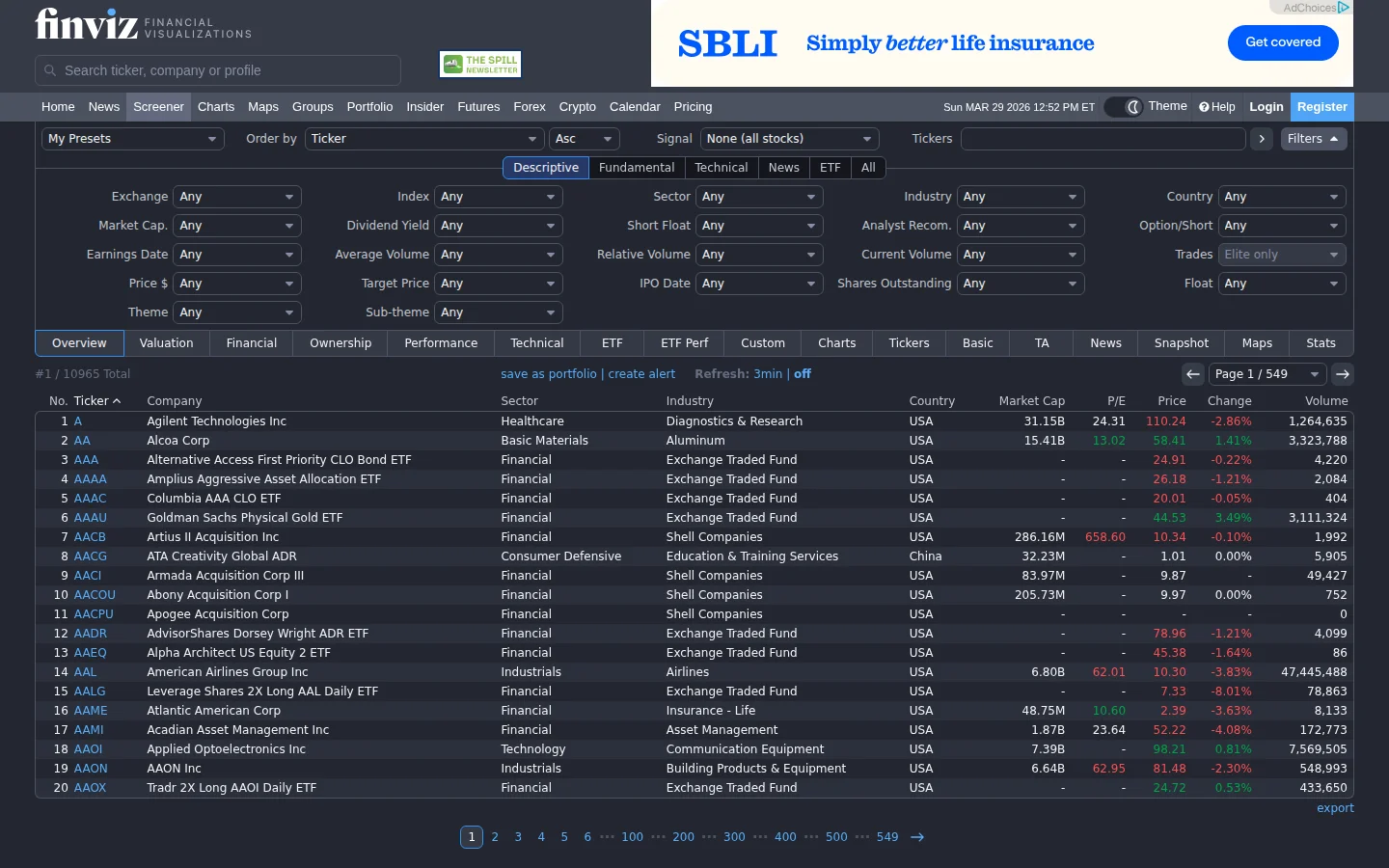
Finviz stock screener with fundamental and technical filters
Finviz is most useful as a fast watchlist builder before deeper chart review.

What The Free Version Is Good For

The free Finviz workflow is enough for many swing traders. You can screen US stocks by market cap, sector, industry, volume, relative volume, price performance, valuation, earnings growth, margins, moving-average position, RSI, volatility and pattern-style filters. That combination is why Finviz still shows up in so many trader routines: it makes daily market triage easy.

For a practical morning routine, start with broad conditions, not obscure filter stacks. Check the market heat map, look at sector leadership, screen for unusual volume or relative strength, then open a small candidate list in TradingView. If you journal those candidates in TraderTrac afterward, you can see whether the Finviz scan is helping or just creating attractive but low-quality setups.
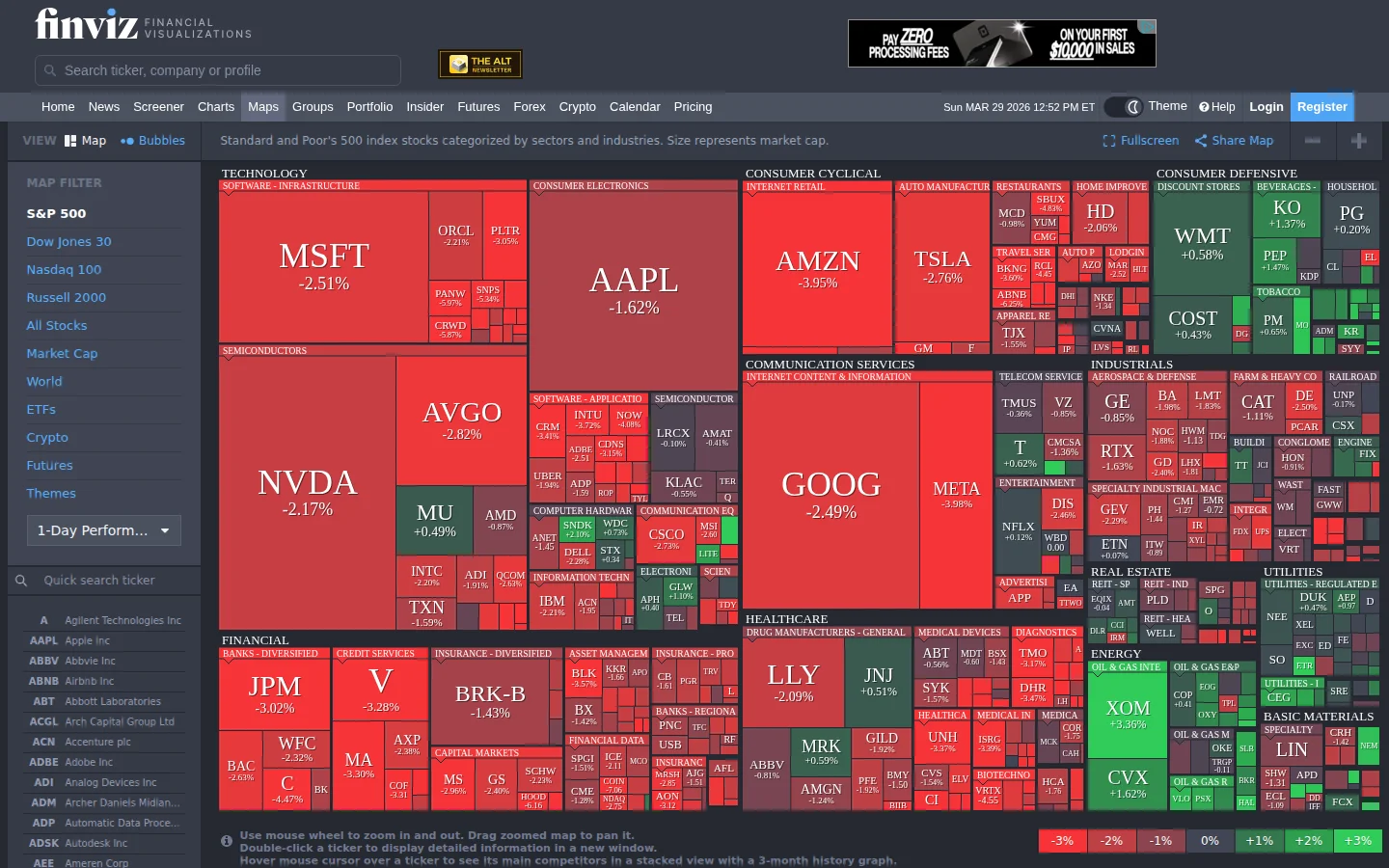
Finviz market heat map showing sector and stock performance
The heat map is useful for sector context, but it should not replace a trade plan.

Finviz Elite: When Paying Makes Sense

Finviz Elite is mainly for traders who need real-time data, more alerting, export, backtesting and an ad-free workflow. The official Finviz FAQ currently lists Elite at $39.50 monthly or $299.50 annually, with a 7-day free trial. That makes the annual plan the better value if Finviz is already part of your daily workflow, but it is not a reason to subscribe before you know exactly how you will use it.

Elite is easiest to justify for active stock traders who prepare watchlists before the open, use premarket movers, export scans, monitor alerts and want real-time refreshes. It is harder to justify if you only run a few end-of-day screens per week. In that case, the free tier plus a stronger charting workflow may be enough.

Where Finviz Falls Short

Finviz is not a serious options platform, not a broker, not a trading journal and not a custom scripting environment. The charts are helpful for context, but they are not a substitute for TradingView, thinkorswim or a broker terminal. The heat maps can also become a vanity feature if you stare at red and green boxes without turning them into a repeatable plan.

The biggest mistake is treating Finviz results as trade signals. A scanner only finds candidates. The trader still needs a thesis, entry, stop, position size and review loop. That is why Finviz works best as the first stage in a process: screen in Finviz, validate on charts, execute in a broker, then review outcomes in a journal.

Best Finviz Workflow

  1. Use the heat map to identify whether leadership is broad, narrow or defensive.
  2. Build a simple scan around liquidity, relative volume and your preferred setup type.
  3. Open the top candidates in TradingView for multi-timeframe chart review.
  4. Write the reason for each trade before entry, not after the result is known.
  5. Review scan outcomes weekly in TraderTrac, TradeZella or another journal.

That workflow keeps Finviz in the role where it is strongest: fast idea generation. It also prevents the common problem where a trader keeps adding filters instead of improving execution.

Bottom Line

Finviz remains one of the best free stock screeners because it is fast, useful and easy to keep in a daily routine. Elite makes sense for traders who need real-time scanning and alerting, but Finviz should still be judged as a screener first. If you need deep charting, pair it with TradingView. If you need proof that your screens are helping, pair it with a trading journal.

Sources checked: Finviz FAQ, Finviz screener, and Finviz heat map.

Editorial Assessment

What We Checked

  • Pricing reviewed across 2 listed plans: Free: Free | Elite: $39.5/mo.
  • Feature fit checked against 4 supported capability flags, including Backtesting, Price Alerts, API Access, News Feed.
  • Best-use recommendation checked against the stated audience: stock screener users, swing traders, fundamental analysts, visual market overview seekers, value investors.
  • Tradeoffs reviewed from the published cons list so the page does not rank tools only by headline rating.

Before You Pay

  • Use the free tier or trial to confirm the workflow before upgrading.
  • Expect manual workflow or external integration work if broker sync matters.
  • Review API limits, latency, and data coverage if you plan to build around it.
  • Check desktop workflow carefully because mobile support is not a listed strength.

Our rating favors tools that solve a specific trading workflow reliably. Finviz is strongest for stock screener users, swing traders, fundamental analysts, visual market overview seekers, and value investors. It is weaker if you need AI Analysis, Paper Trading, Mobile App, Social Features.

Finviz Screenshots

Finviz stock screener with fundamental and technical filters for finding trading opportunities
stock screener
Finviz market heat map showing sector performance and market cap visualization
market heat map

Finviz Pricing

Free

Free
  • 60+ screener filters (fundamental, technical, descriptive)
  • 15-20 minute delayed quotes
  • S&P 500 and full market heat maps
  • Basic daily stock charts with SMA 50/200
  • Insider trading data and news aggregation
  • Futures, forex, crypto overview pages
  • Save up to 50 screener presets (registered)
  • Ads shown
Most Popular

Elite

$39.5 /mo

$24.96/mo billed yearly

  • Real-time quotes refreshed every few seconds
  • 70+ screener filters with advanced criteria
  • Premarket (4 AM) and after-hours (8 PM) data
  • Interactive charts with intraday timeframes (1-min to monthly)
  • Chart pattern recognition (wedges, triangles, H&S, channels)
  • Drawing tools, Fibonacci, indicator overlays
  • Backtesting with 20+ years of historical data
  • Email alerts for price, news, ratings, insider, SEC filings
  • Data export to Excel and API access
  • Ad-free experience
  • 7-day free trial

First-Party Sources Checked

Product status, pricing and feature claims were checked against these vendor resources:

Features

AI Analysis
Backtesting
Paper Trading
Price Alerts
Mobile App
API Access
Social Features
Broker Integration
Custom Indicators
Automated Trading
Trade Journaling
Performance Analytics
Risk Management
News Feed
Education Content

Pros & Cons

Pros

  • + Best free stock screener available -- 60+ filters with fast, responsive results
  • + Iconic heat maps provide instant visual market overview by sector and market cap
  • + Generous free tier that millions of traders use daily without needing to upgrade
  • + Screener speed is genuinely best-in-class -- results load in fractions of a second
  • + Insider trading data and news aggregation included free for every stock
  • + Elite premarket/after-hours data useful for gap scanners and pre-open preparation

Cons

  • - US stocks only -- no international market coverage (no LSE, TSE, European exchanges)
  • - Free version has 15-20 minute data delay and banner ads throughout
  • - Charting is basic even on Elite -- not comparable to TradingView or thinkorswim
  • - No options screening, options flow, or meaningful options chain data
  • - No mobile app -- browser-only with unoptimized mobile experience

Rating Breakdown

4.5
★★★★★

Overall Rating

ease of use
4.7
features
4.5
value
4.5
support
3.8
reliability
4.7

Key Takeaways

  • Best free stock screener available -- 60+ filters with fast, responsive results
  • Iconic heat maps provide instant visual market overview by sector and market cap
  • Generous free tier that millions of traders use daily without needing to upgrade
  • Screener speed is genuinely best-in-class -- results load in fractions of a second
  • Insider trading data and news aggregation included free for every stock
  • Elite premarket/after-hours data useful for gap scanners and pre-open preparation
  • Rated 4.5/5 — best for stock screener users, swing traders, fundamental analysts, visual market overview seekers, value investors
  • $ Free tier available

Summary

Powerful stock screener with market heat maps, fundamentals, technical filters, and real-time quotes on the Elite plan. Finviz offers a free tier, with paid plans from $39.5/month. Best suited for stock screener users, swing traders, fundamental analysts, visual market overview seekers, and value investors.

Finviz Guides

📖
Best Pre-Market Scanners For Gap Trading In 2026 8 min read
📖
Stock Screener Strategies: How To Find Winning Trades Before They Move 8 min read
📖
The Ultimate Pre-Market Routine For Day Traders 8 min read
📖
Zacks Investment Research Pricing Explained: All Plans, Costs & Fees (2026) 5 min read
📖
Zacks Investment Research Complete Guide: Setup, Features & Tips (2026) 8 min read
📖
Zacks Investment Research Tips and Tricks Every Trader Should Know (2026) 7 min read
📖
thinkorswim Scanner Pricing Explained: All Plans, Costs & Fees (2026) 5 min read
📖
thinkorswim Scanner Tips and Tricks Every Trader Should Know (2026) 10 min read
📖
Trade Ideas Pricing Explained: All Plans, Costs & Fees (2026) 6 min read
📖
Trade Ideas Complete Guide: Setup, Features & Tips (2026) 9 min read
📖
thinkorswim Scanner Complete Guide: Setup, Features & Tips (2026) 9 min read
📖
Stock Rover Pricing Explained: All Plans, Costs & Fees (2026) 5 min read
📖
Stock Rover Complete Guide: Setup, Features & Tips (2026) 8 min read
📖
Stock Rover Tips and Tricks Every Trader Should Know (2026) 8 min read
📖
Scanz Pricing Explained: All Plans, Costs & Fees (2026) 5 min read
📖
Scanz Complete Guide: Setup, Features & Tips (2026) 9 min read
📖
Scanz Tips and Tricks Every Trader Should Know (2026) 9 min read
📖
How to Use Market Chameleon for Options Flow Analysis (2026) 7 min read
📖
Market Chameleon Pricing Explained: All Plans, Costs & Fees (2026) 5 min read
📖
Market Chameleon Complete Guide: Setup, Features & Tips (2026) 9 min read
📖
Finviz Pricing Explained: All Plans, Costs & Fees (2026) 5 min read
📖
Finviz Tips and Tricks Every Trader Should Know (2026) 8 min read
📖
Finviz Complete Guide: Setup, Features & Tips (2026) 7 min read
📖
Benzinga Pro Pricing Explained: All Plans, Costs & Fees (2026) 5 min read
📖
Benzinga Pro Complete Guide: Setup, Features & Tips (2026) 9 min read
📖
Benzinga Pro Tips and Tricks Every Trader Should Know (2026) 9 min read
📖
How To Use Finviz For Stock Screening: Step By Step Guide 8 min read
📖
Free Stock Screeners Compared: Finviz Vs Tradingview Vs Webull 8 min read
📖
Market Chameleon Tips and Tricks Every Trader Should Know (2026) 9 min read
📖
Trade Ideas Tips and Tricks Every Trader Should Know (2026) 7 min read

Compare Finviz

View 4 more Finviz comparisons
View all Finviz alternatives →

Finviz Rankings

Alternatives Worth Checking

A note on links: if you buy or sign up through certain links on this page, we may earn a small commission. Reviews stay independent regardless.