- Price: Premium $49.99/month. Vespryx (GEX levels on TradingView charts), the TradingView indicator suite and the Broker & Journal Connection are currently included at no extra cost.
- Free options: a free tier with "basic flow access", plus free tools such as the Options Profit Calculator (no account needed), News Wire and the Day Trading Watch List.
- Trial: 7 days free on Premium (card required, no charge for 7 days, cancel anytime).
- Discord Flow Bot: $99/month per server, with a 14-day trial and no card.
- Platforms: web app; Vespryx is a Chrome extension for TradingView.
- Official channels: tradermatrix.pro · Discord · YouTube · X · Instagram
TraderMatrix Review 2026: Options Flow, GEX and Ready-Made Scanners That Answer the Day's Questions
TraderMatrix is a young options-flow and market-context platform that packs about 40 tools into one login. The easiest way to describe it is the way our senior reviewer did after his first session: "this software answers a lot of questions I have during the day."
By TradingToolsHub · Published 24 Oct 2026 · Updated 24 Oct 2026
★★★★☆ 4.2/5
optionsflowGEXstocks
Quick Facts
- Starting Price
- Free tier
- Premium
- $49.99/mo
- Free Tier
- Yes
- Trial
- 7 days
- Platforms
- Web + TradingView
- Best for
- Options flow
- Discord Bot
- $99/mo/server
Quick facts
Verdict
TraderMatrix feels like it was built by someone who trades and has thought hard about what they keep checking. In our reviewer's view, its smartest idea is to put things side by side that are normally hard to check together. The Heat Score combines momentum and relative volume (RVOL) with net options premium in one 0–100 number per ticker, rescored every minute the market is open. Around that sit gamma (GEX) levels with a plain-English "Tomorrow's Map", a scanner for descending triangles, a Wheel Tracker that suggests covered calls on shares you already own, and a top-down Market Health dashboard that explains every number it shows.
It has covered the bases on onboarding too. There are Lite and Pro views with guided tours, a Learn page that narrows the platform to five trading "paths" with a quiz to pick one, a plain-English glossary, and YouTube tutorials, including a full platform walkthrough.
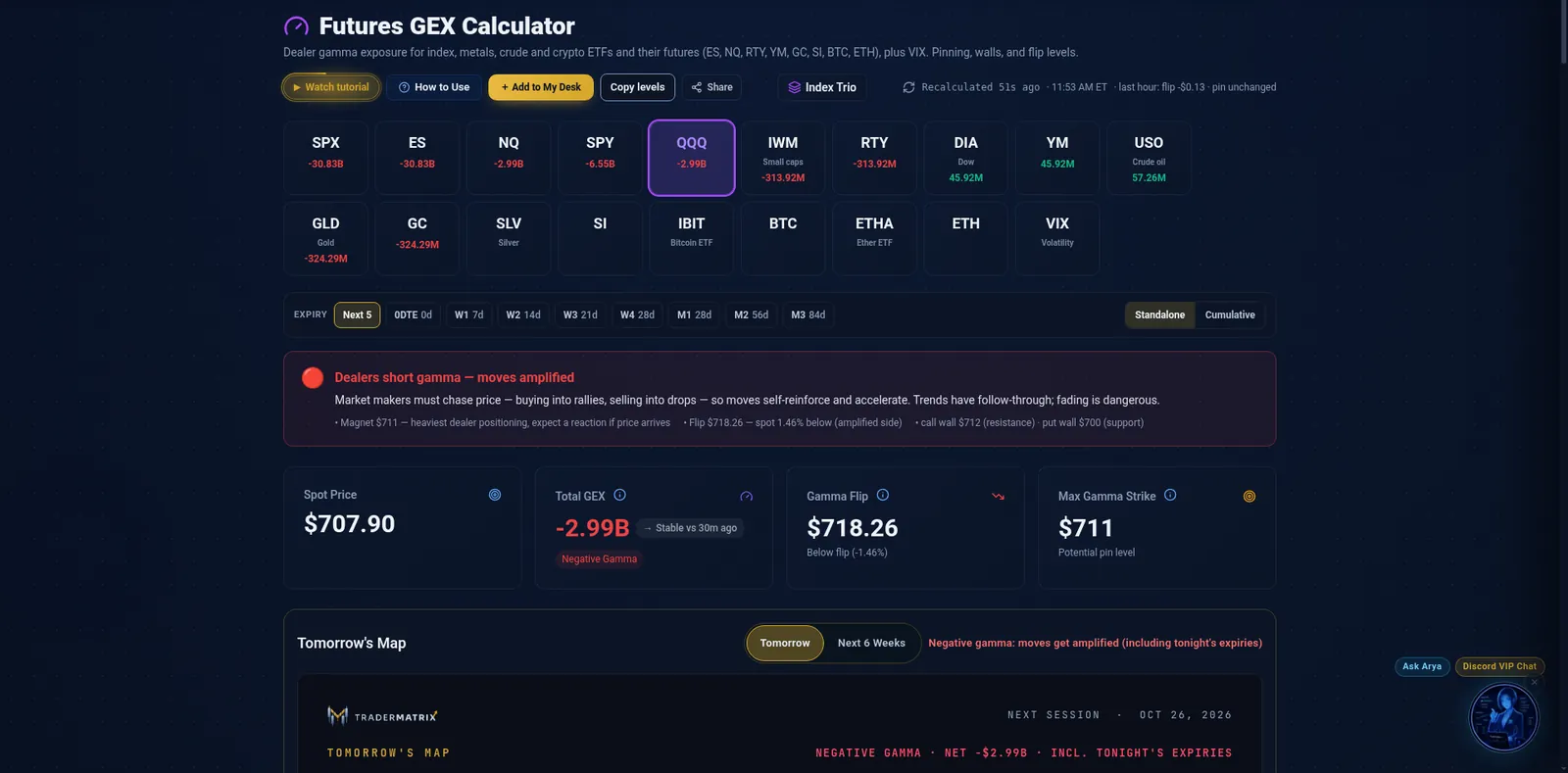
One thing to know before you buy: TraderMatrix is a research and context tool, not a trade-signal service. It doesn't hand you an entry, a stop and a target. The "Trade" button in the menu is marked "coming soon". What it does is tell you where the options money is going, where dealers are positioned and what kind of day to expect. During our session, its GEX page had QQQ in short gamma below its flip, and its map is built to tell you when a day is likely to be a pin-and-chop day rather than a trend day. That kind of read is often the most useful thing a new trader can have.
Best for: newer and intermediate options and stock traders who want ready-made screeners and flow context without spending days on configuration; wheel and covered-call traders; traders who want GEX levels on their TradingView charts.
Less suited to: traders who want a tool to give them exact trade signals; traders who want gamma levels on every single stock (the GEX calculator covers indexes, ETFs and futures, while single stocks get Apex levels on the ticker page); advanced scanner users who want to build every condition themselves (see Trade Ideas).
How we tested
- Who: our senior reviewer, an active US stock and options trader.
- When: 23 Oct 2026, before the open and during US market hours.
- Access: TraderMatrix gave us a complimentary Premium account for this review.
- What: My Desk, the Lite and Pro tours, the Learn page and glossary, Options Flow (Unusual Activity, Heat Map, Dark Pool, Sector Flow), the Heat Score board, Find Setups (Breaking Out, Breaking Out Triangle, Gap Continuation, Apex Magnet and others), the Futures GEX Calculator, Ticker Search and Ticker Lab (including Position Doctor), the Wheel Tracker, Market Health, Politician Trades and alerts.
- AI assistance: AI tools helped us map the platform's features; the testing and the opinions are our reviewer's.
- Vendor material: where we describe a feature from TraderMatrix's own pages rather than our own use (for example Arya, the MCP connector and the Discord Flow Bot), we say so.
What TraderMatrix is
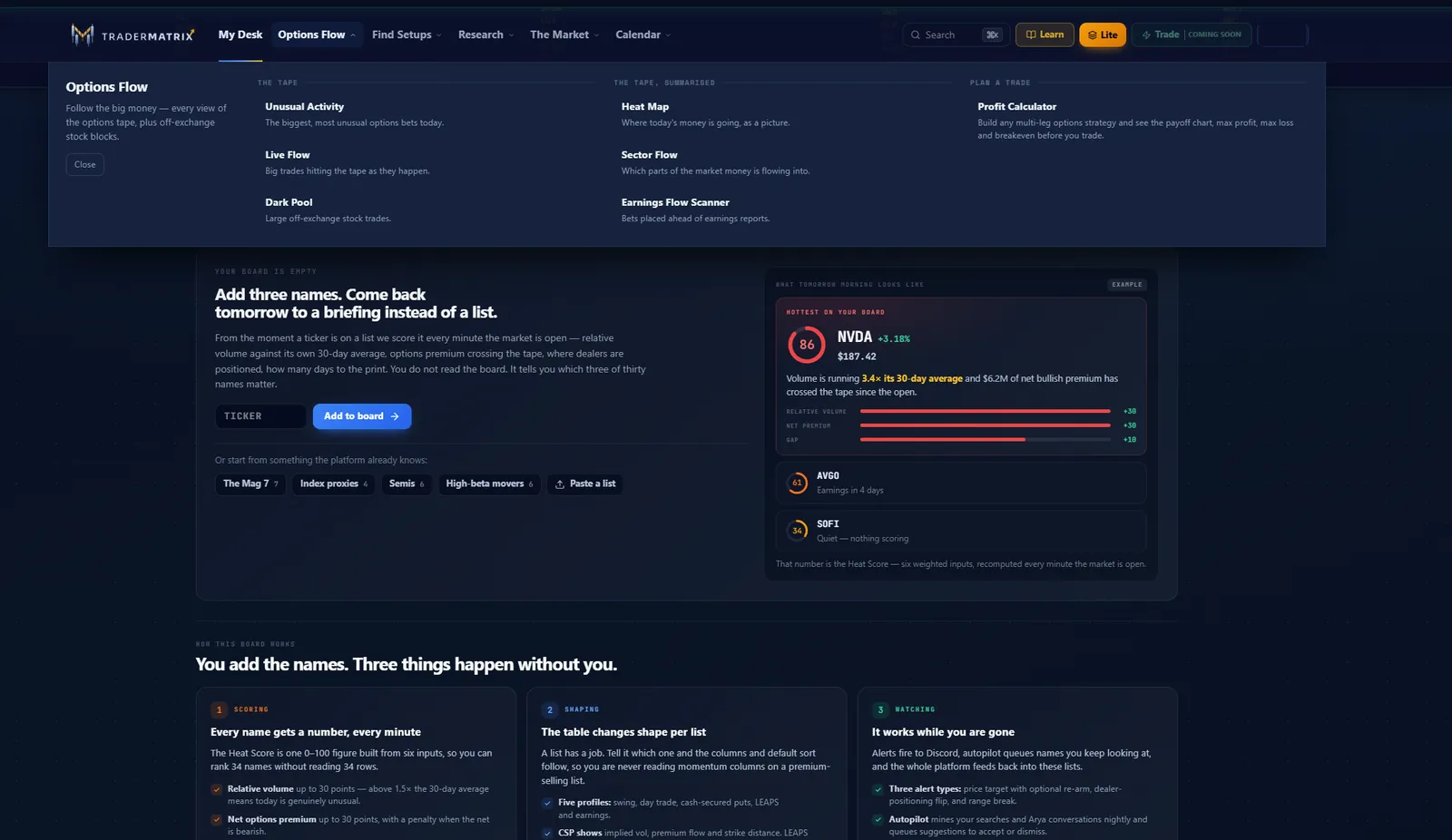
TraderMatrix is a browser platform for options flow, dealer positioning (GEX) and scanning, aimed at retail traders. Its menu groups roughly 40 tools under seven headings:
| Area | What's in it |
|---|---|
| Options Flow | Unusual Activity, Live Flow, Heat Map, Sector Flow, Earnings Flow, Dark Pool (FINRA off-exchange data), the Options Profit Calculator (free, no account) |
| Find Setups | Breaking Out (daily and hourly), Breaking Out Triangle, Reversal Finder, Gap Continuation, Tape Confirmed, Day Trading Watch List, Apex Magnet, Momentum Pullback, Cash-Secured Puts, Covered Calls, LEAPS, Long Term Buy Zone, 2x Leveraged ETFs |
| Research | Ticker Search (a one-page dossier per ticker), Ticker Lab (multi-leg strategies, P&L heat matrix, AI strategy ranker), Position Doctor, Hedge Shopper, Liquidity Map, Long Term |
| The Market | Market Health, the Futures GEX Calculator, Politician Trades, CBOE Options Scanner, News Wire, World Map |
| Calendars | Earnings, Dividend, Economic, Insider Activity (Form 4), Hedge Fund Tracker (13F) |
| Your tools | Watchlist and Heat Score board, Alerts, Trade Journal, Portfolio, Wheel Tracker, IPO Scanner |
| AI and automation | Arya (AI assistant), Discord alerts, an MCP server and API for Claude and Cursor, the Discord Flow Bot |
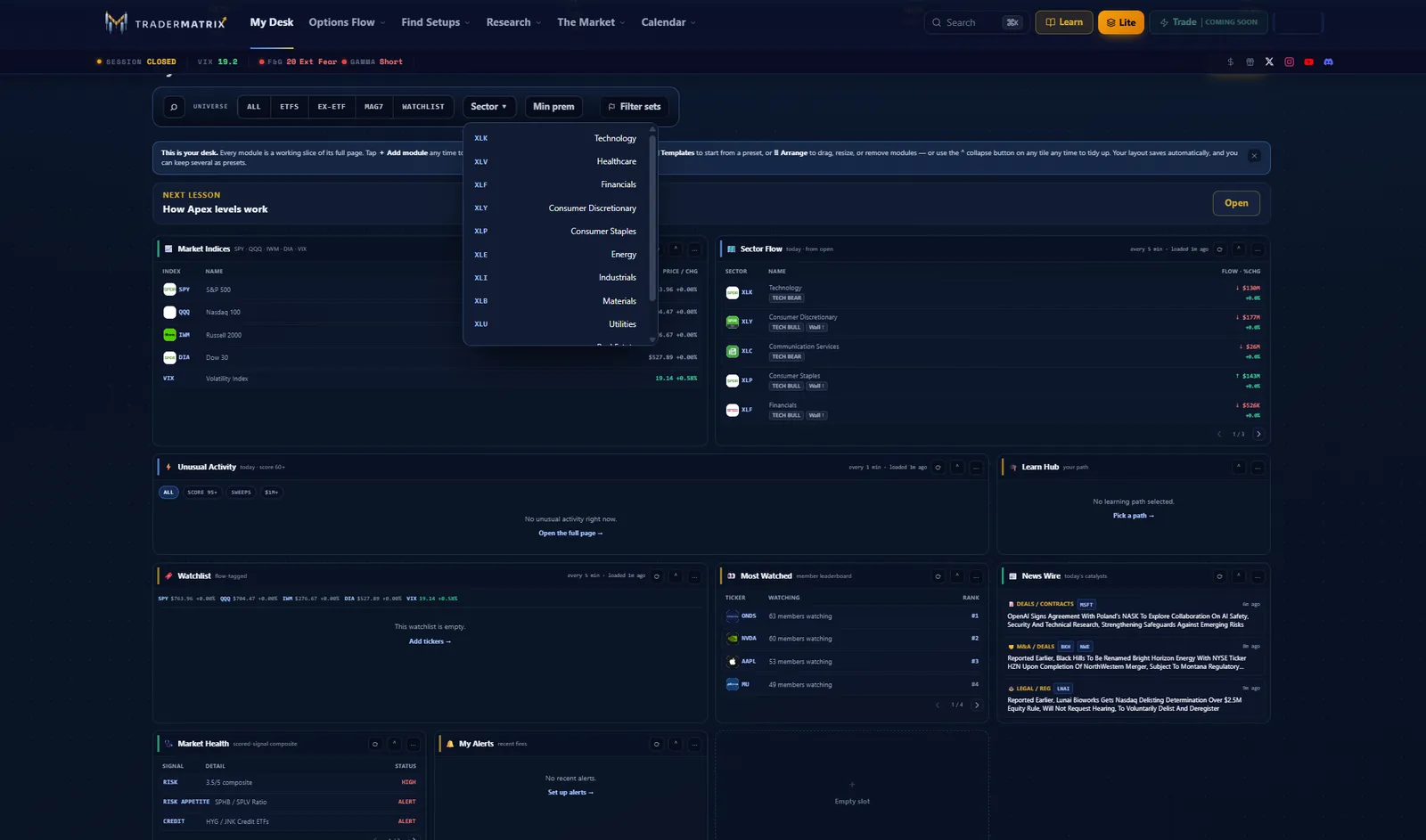
My Desk is the home screen: a grid of live modules (indices, sector flow, unusual activity, your watchlist, the most-watched names, news and Market Health) that you can rearrange, resize or save as presets.
Beyond the main platform, TraderMatrix offers Vespryx (a Chrome extension that draws GEX and flow levels on TradingView charts), a TraderMatrix indicator suite for TradingView, the Discord Flow Bot for trading communities, TickerTrace (a free ETF holdings tracker) and Vero, a free Android app that teaches chart reading.
Onboarding and training: the bases are covered
For a small, new company, TraderMatrix has put unusual effort into helping people learn.
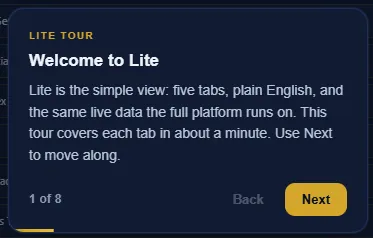
- Lite and Pro views. Lite is "the simple view: five tabs, plain English, and the same live data the full platform runs on", with an eight-step tour. Pro shows the full platform and has its own longer guided tour. You can switch at any time.
- The Learn page (/learn, no account needed) sorts the platform into five ways people trade: Day Trading & 0DTE, Futures, Swing, Wheeling and Long-Term. Each path narrows about 40 tools down to four or five, with a playbook and a walkthrough video. A two-minute quiz picks a path for you.
- The glossary (/glossary) explains about 50 terms in plain English, from the Greeks and GEX to call and put walls, the gamma flip, RVOL and confluence. It's a strong asset for beginners.
- Built-in help. Most tools have "Watch tutorial" and "How to Use" buttons, and pages such as Market Health add a short explanation next to each number.
- YouTube. The full platform walkthrough covers the whole platform, and shorter tutorials cover single tools such as Unusual Activity, Apex Magnet, Dark Pools, trading NQ off GEX levels and setting up the MCP connector.
- The Sunday Edge: a free weekly email (Sundays, 6 PM ET) with key levels, catalysts, flows and breakouts for the week ahead. Our reviewer signed up.
The ideas that stand out
1. The Heat Score: momentum, RVOL and net options premium in one number
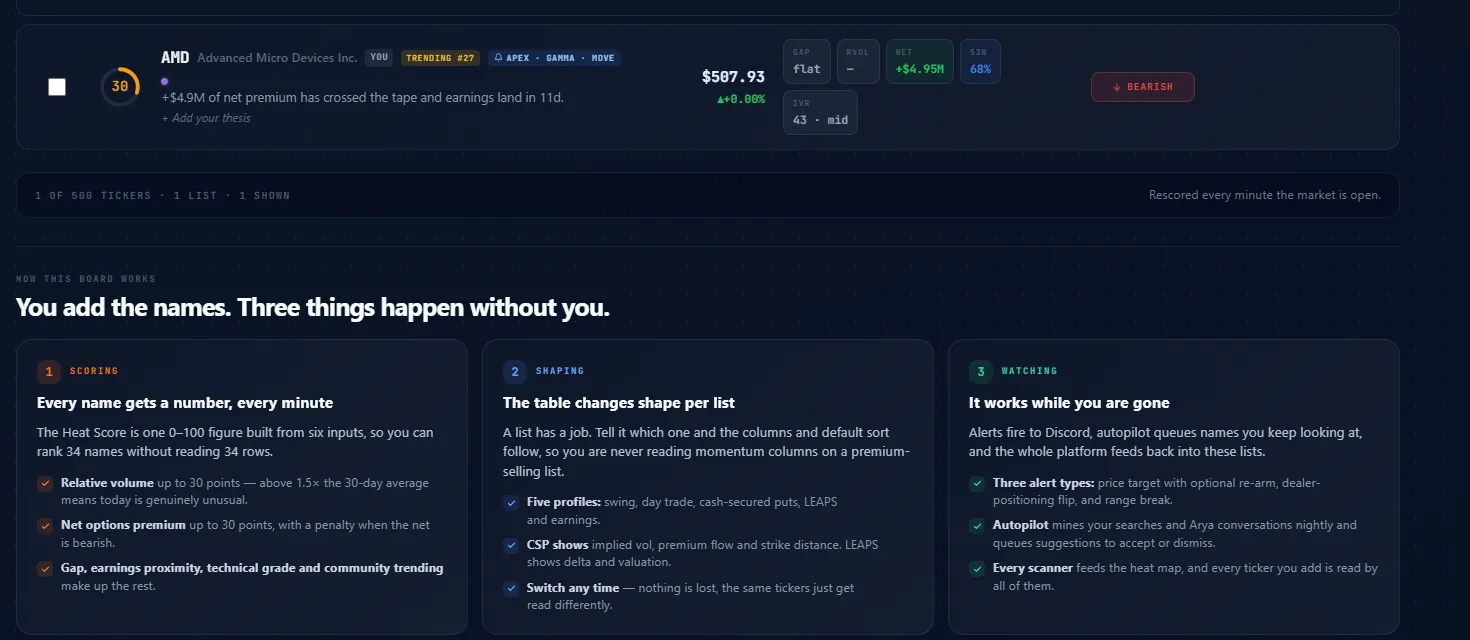
This is where our reviewer felt the platform was built by someone who had really thought it through. Checking momentum, relative volume and net options premium together normally means three screens. The Heat Score folds them into one 0–100 number per ticker on your own board:
- Relative volume: up to 30 points. Above 1.5x the 30-day average "means today is genuinely unusual".
- Net options premium: up to 30 points, with a penalty when the net is bearish.
- The rest: gap, earnings proximity, technical grade and community trending.
It is "rescored every minute the market is open". The board changes shape for five profiles (swing, day trade, cash-secured puts, LEAPS and earnings), so a premium-selling list shows implied volatility and strike distance instead of momentum columns. An Autopilot feature suggests names based on your searches, and alerts can go to Discord.
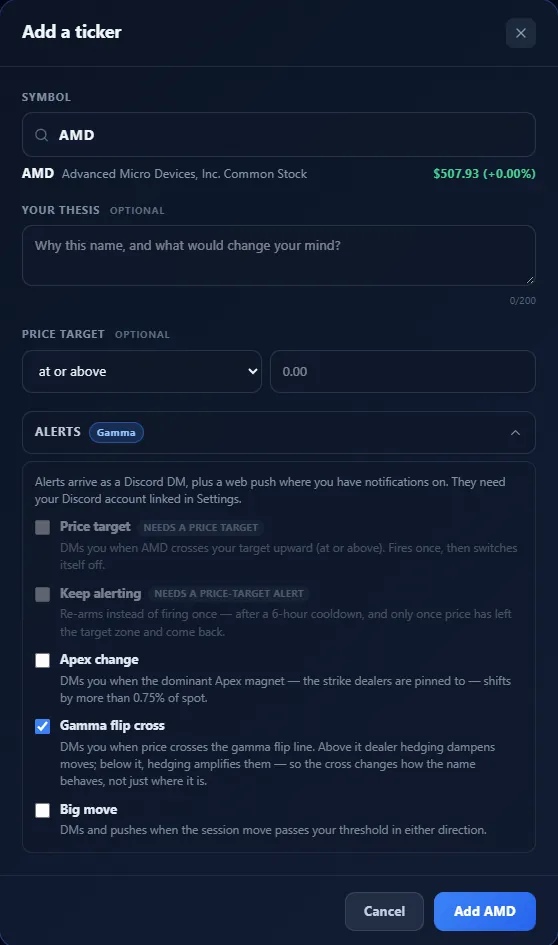
Before the open, our reviewer added AMD. Its card read Heat 30, "+$4.9M of net premium has crossed the tape and earnings land in 11d", with RVOL still blank because the session hadn't started.
Adding a ticker takes one dialog: an optional thesis ("Why this name, and what would change your mind?"), an optional price target and alerts for a price target, an Apex magnet change, a gamma flip cross or a big move. Alerts arrive as a Discord DM plus a web push, so you need to link Discord first.
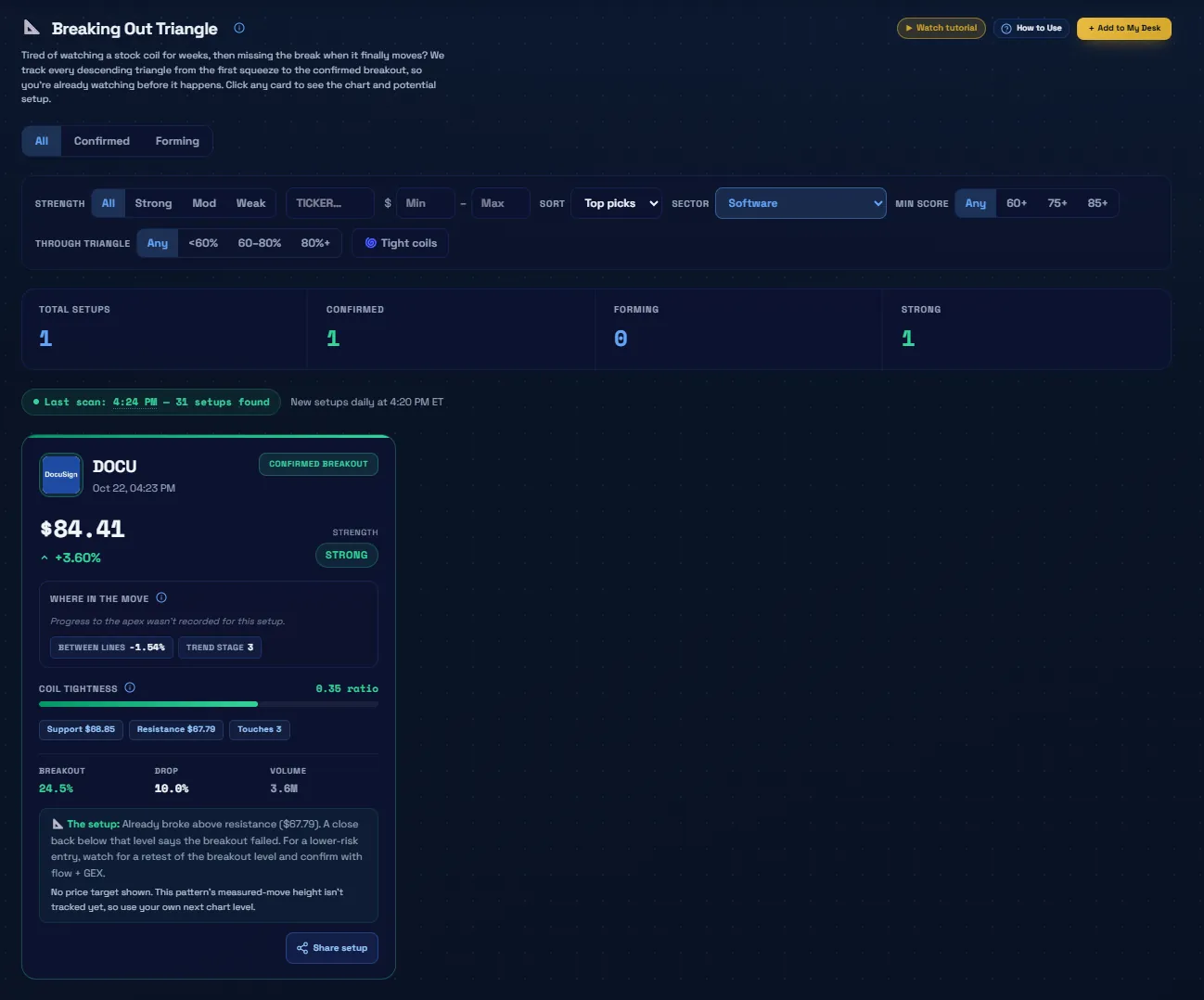
2. Breaking Out Triangle: "I have looked for this exact thing so many times"
That was our reviewer's reaction to the Breaking Out Triangle scanner. It tracks descending triangles "from the first squeeze to the confirmed breakout", with All, Confirmed and Forming tabs and filters for strength, price, sector, minimum score, how far price has moved through the triangle, and tight coils. It scans daily at 4:20 PM ET. The 22 Oct scan found 31 setups.
With the Software filter on, it showed DOCU as a confirmed, strong breakout on 22 Oct at $84.41 (+3.60%): support $66.85, resistance $67.79, three touches, a coil tightness ratio of 0.35 and volume of 3.6M. The card also explains the setup in plain words: a close back below the breakout level means the breakout failed, and the lower-risk entry is a retest. It's honest about its limits, too: "No price target shown. This pattern's measured-move height isn't tracked yet, so use your own next chart level."
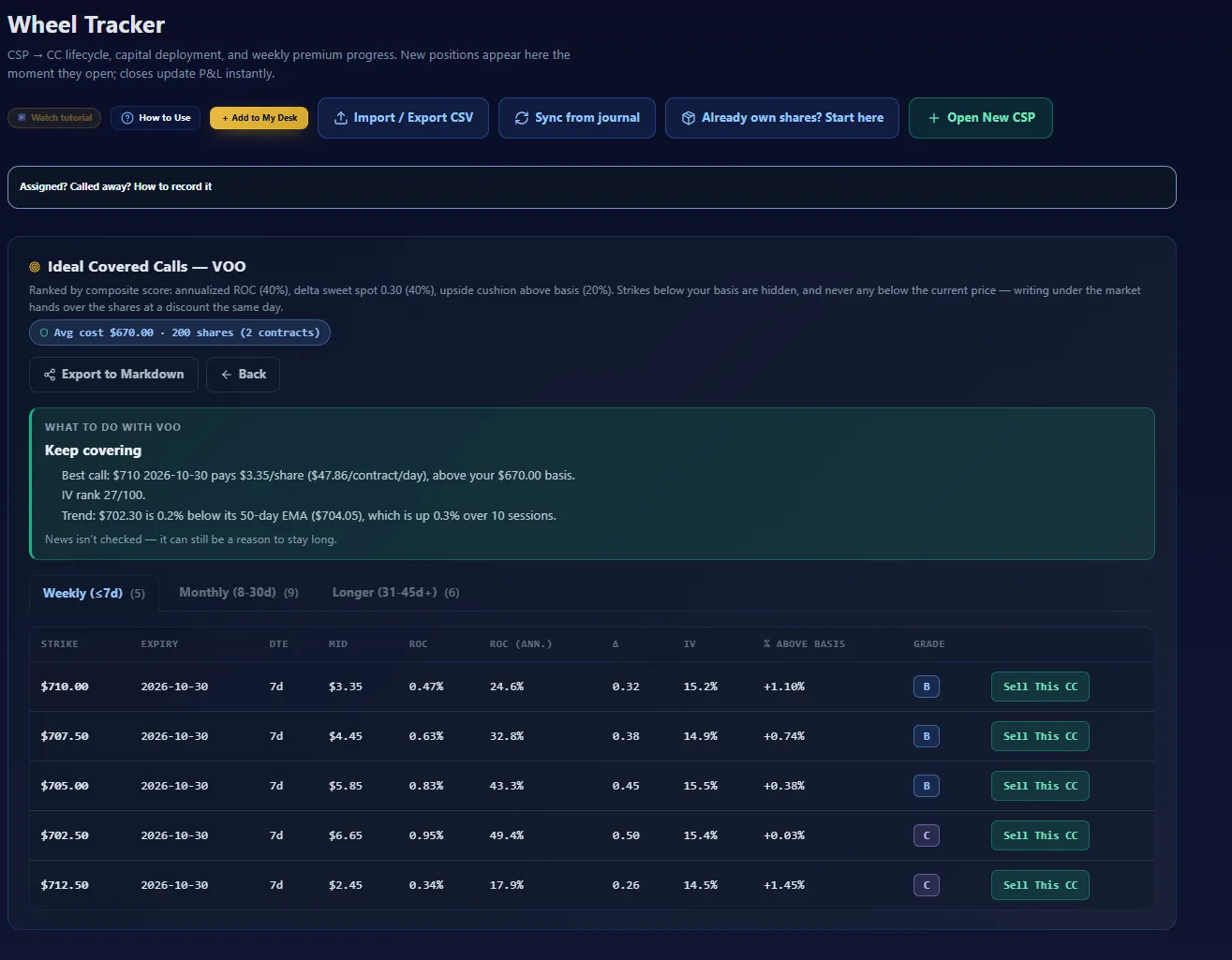
3. Wheel Tracker: start from the shares you already own
Most wheel tools start with selling a put. The Wheel Tracker also lets you start from shares you already hold ("Already own shares? Start here") and then suggests what to do with them. We entered an example position of 200 VOO shares at a $670 average cost. The verdict was "Keep covering": the best call was the $710 strike expiring 30 Oct 2026, paying $3.35 a share ($47.86 per contract per day), with IV rank 27/100 and a trend note against the 50-day EMA. It also notes that "News isn't checked".
Calls are ranked by annualized return on capital (40%), a delta close to 0.30 (40%) and cushion above your basis (20%), and graded A to F across Weekly, Monthly and Longer tabs. Strikes below your basis are hidden, and so are strikes below the current price. It also has CSV import and export, sync from the journal and export to Markdown.
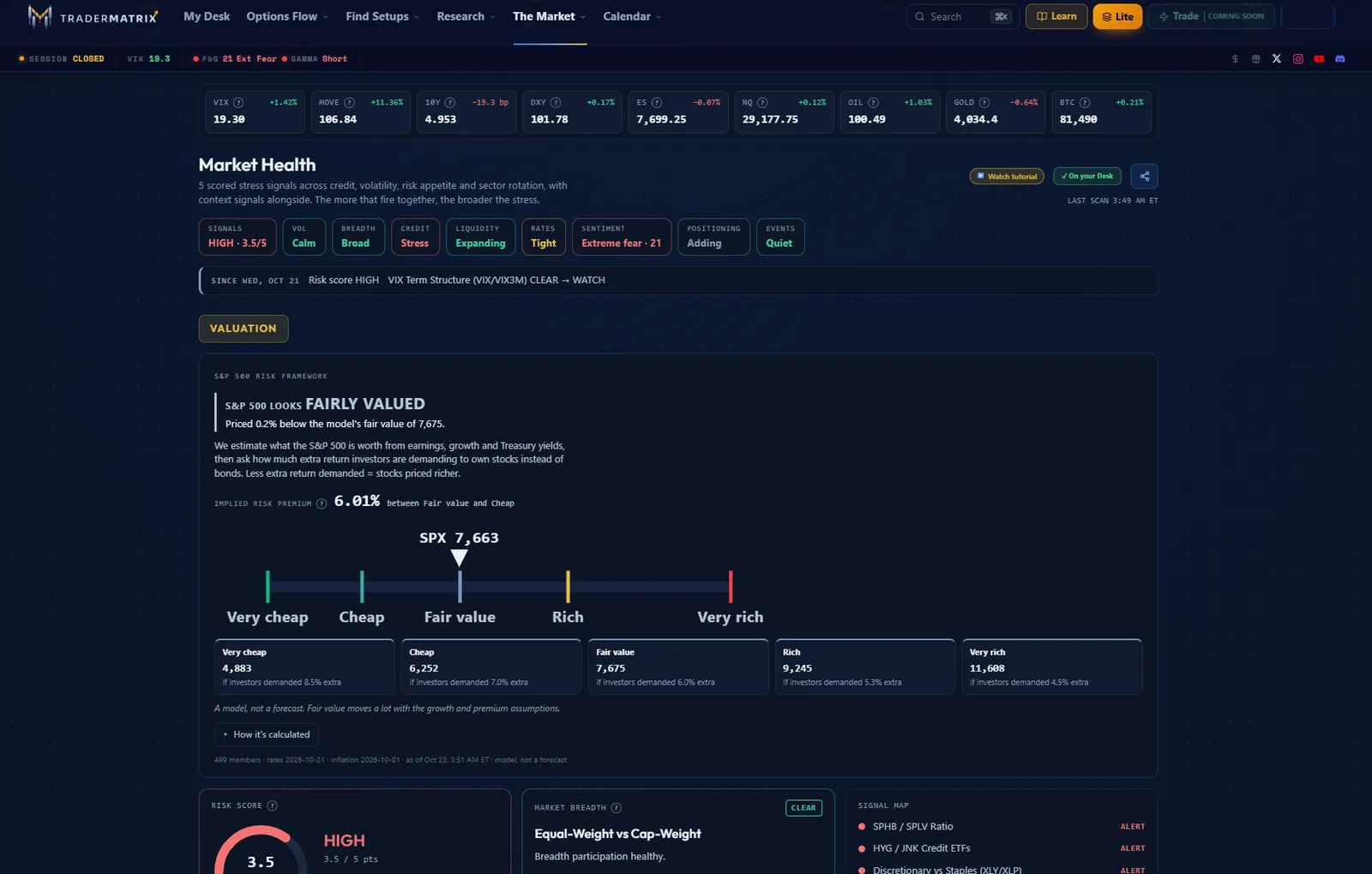
4. Market Health: a top-down dashboard with the reasoning shown
Market Health scores five stress signals (credit, volatility, risk appetite and sector rotation) and adds context chips for breadth, liquidity, rates, sentiment, positioning and events. Before the open on 23 Oct (last scan 3:49 AM ET) it read HIGH 3.5/5: volatility Calm, breadth Broad, credit Stress, liquidity Expanding, rates Tight, sentiment Extreme fear (21), positioning Adding, events Quiet. A change line showed what had moved since 21 Oct: VIX term structure from CLEAR to WATCH.
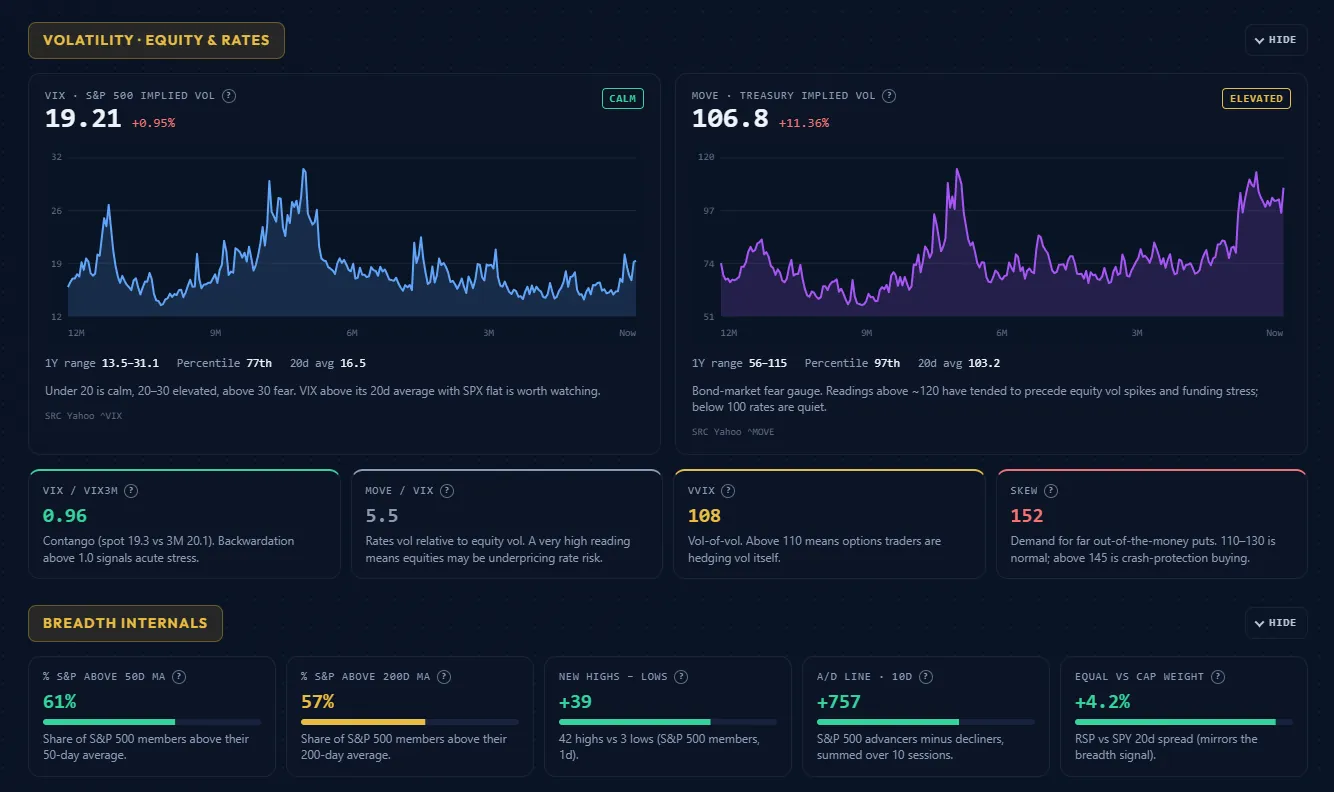
It also has an S&P 500 valuation model. That morning it put the SPX at 7,663 against a fair value of 7,675 ("fairly valued", 0.2% below) on a scale from "very cheap" (4,883) to "very rich" (11,608). It labels this "a model, not a forecast" and links to how it's calculated. Further down, VIX (19.21, "Calm", 77th percentile over a year), MOVE (106.8, "Elevated", 97th percentile), VIX/VIX3M, VVIX, SKEW and breadth internals (61% of stocks above their 50-day average, new highs minus new lows +39) each come with a plain-English note on what the level means.
Our reviewer singled this out: it's a macro view most retail tools don't have, and because every number is explained, new traders learn as they read. TraderMatrix's own guide says to treat the score as a guide to sizing, not a call on direction.
5. GEX levels and Tomorrow's Map in plain English
The Futures GEX Calculator shows dealer gamma for index, metals, crude and crypto ETFs and their futures (SPX, ES, NQ, SPY, QQQ, IWM and others, plus VIX). It shows the gamma flip, the call and put walls, the max-gamma "pin" strike and the regime, recalculated through the day. Single stocks get the same idea on their Ticker Search page as Apex levels: a dominant magnet, the nearest ceiling and floor, and the flip, each scored 0–100.
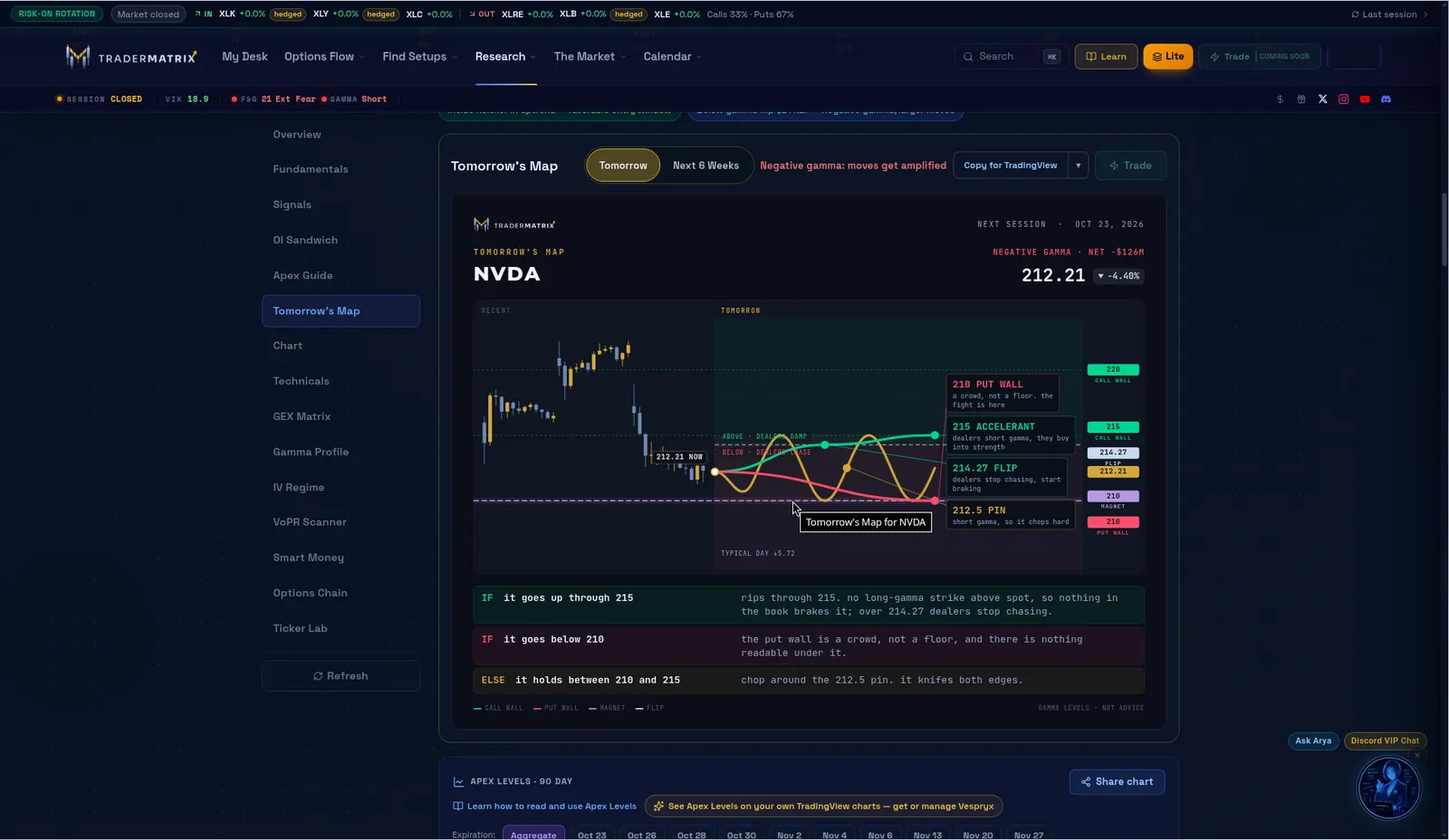
The standout is Tomorrow's Map, which turns the levels into if/then sentences. For NVDA before the open on 23 Oct it read: if it goes up through 215, "nothing in the book brakes it"; if it goes below 210, "the put wall is a crowd, not a floor"; otherwise, "chop around the 212.5 pin". That's the kind of read a newer trader can act on without knowing the maths behind it.
6. Research tools that do the thinking with you
- Ticker Search builds a one-page dossier: price, options sentiment, average IV and IV percentile, max pain, fundamentals with FINRA short interest, the OI Sandwich, Apex levels, a gamma profile and Smart Money (Congress trades, ETF flows, Form 4 filings).
- Ticker Lab builds multi-leg strategies with payoff charts, a P&L heat matrix under different volatility scenarios, and a "Let AI build it" strategy ranker.
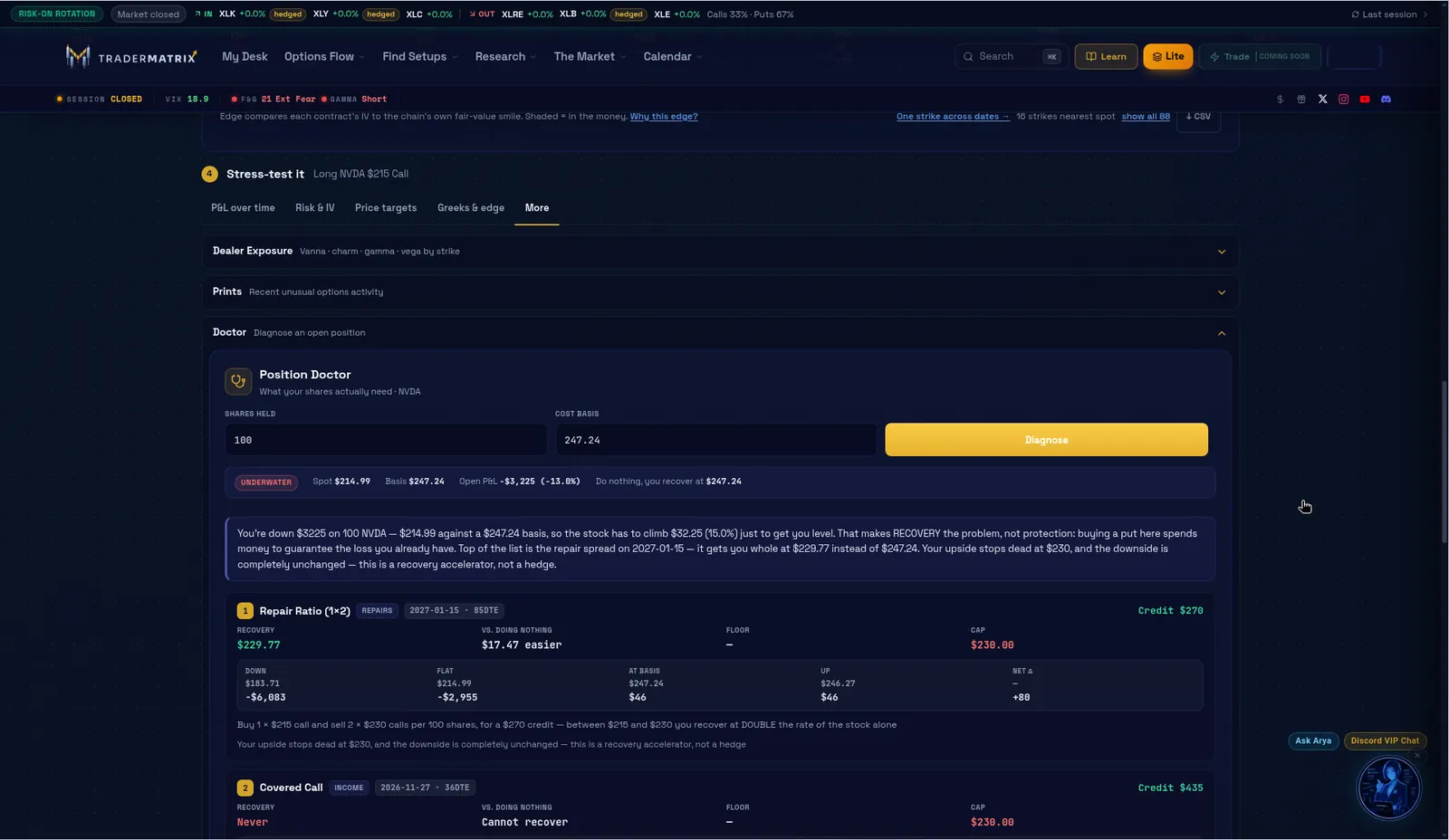
- Position Doctor (inside Ticker Lab) takes an underwater stock position and ranks repairs. For a 100-share NVDA example it proposed a 1x2 repair ratio, a covered call, a collar and a protective put, each with its recovery price.
- Hedge Shopper sizes downside protection to the expected move and ranks hedges.
7. Sector rotation, politician trades and the rest
- Sector Flows shows the options lean per sector (0–100), flow against normal, FINRA dark-pool accumulation or distribution, and Rotation Plays, which runs every scanner on the sectors money is moving into or out of. It also flags watchlist names sitting in sectors money is leaving.
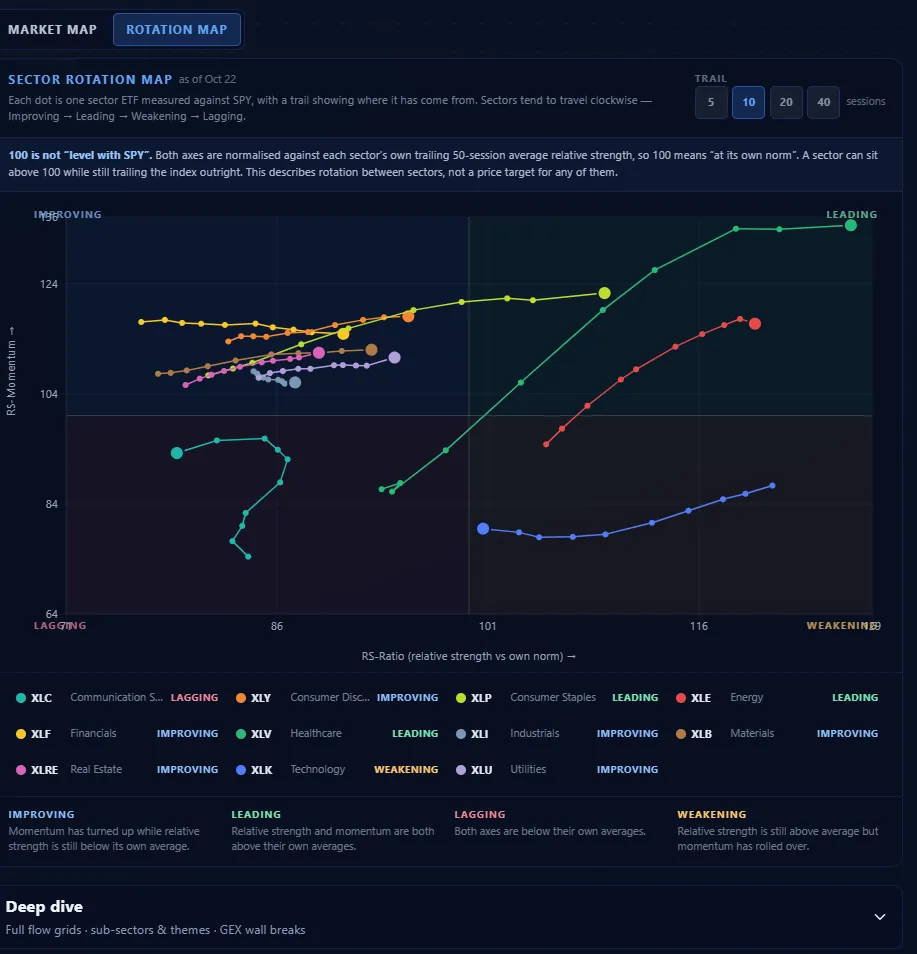
- Rotation Map: an RRG-style chart of sectors against SPY, with 5-, 10-, 20- and 40-session trails.
- Politician Trades (beta): congressional filings with party, chamber and buy/sell filters, a disclosure-delay column and a reminder that the STOCK Act allows a 45-day lag.
8. AI and automation (from TraderMatrix's pages)
We didn't test these hands-on, so this is how TraderMatrix describes them. Arya is an AI assistant that "calls the platform's live data and 58 tools" and can see your watchlist and positions. The MCP server and API let Claude, Cursor and other AI clients query TraderMatrix data directly, with a limited free preview. The Discord Flow Bot posts 8 alert types and offers 26 slash commands to a whole server for $99 a month.

During market hours
During the session the platform stayed live and useful as a context layer:
- GEX (11:53 ET): the QQQ tile showed total GEX of -$2.99B, "Dealers short gamma, moves amplified", a gamma flip at $718.26 with price below it, and a max-gamma strike of $711 as the potential pin.
- Gap Continuation (11:09 ET): three gap-ups and 17 gap-downs that had held their opening range, each graded and checked against dealer positioning, flow and sector.
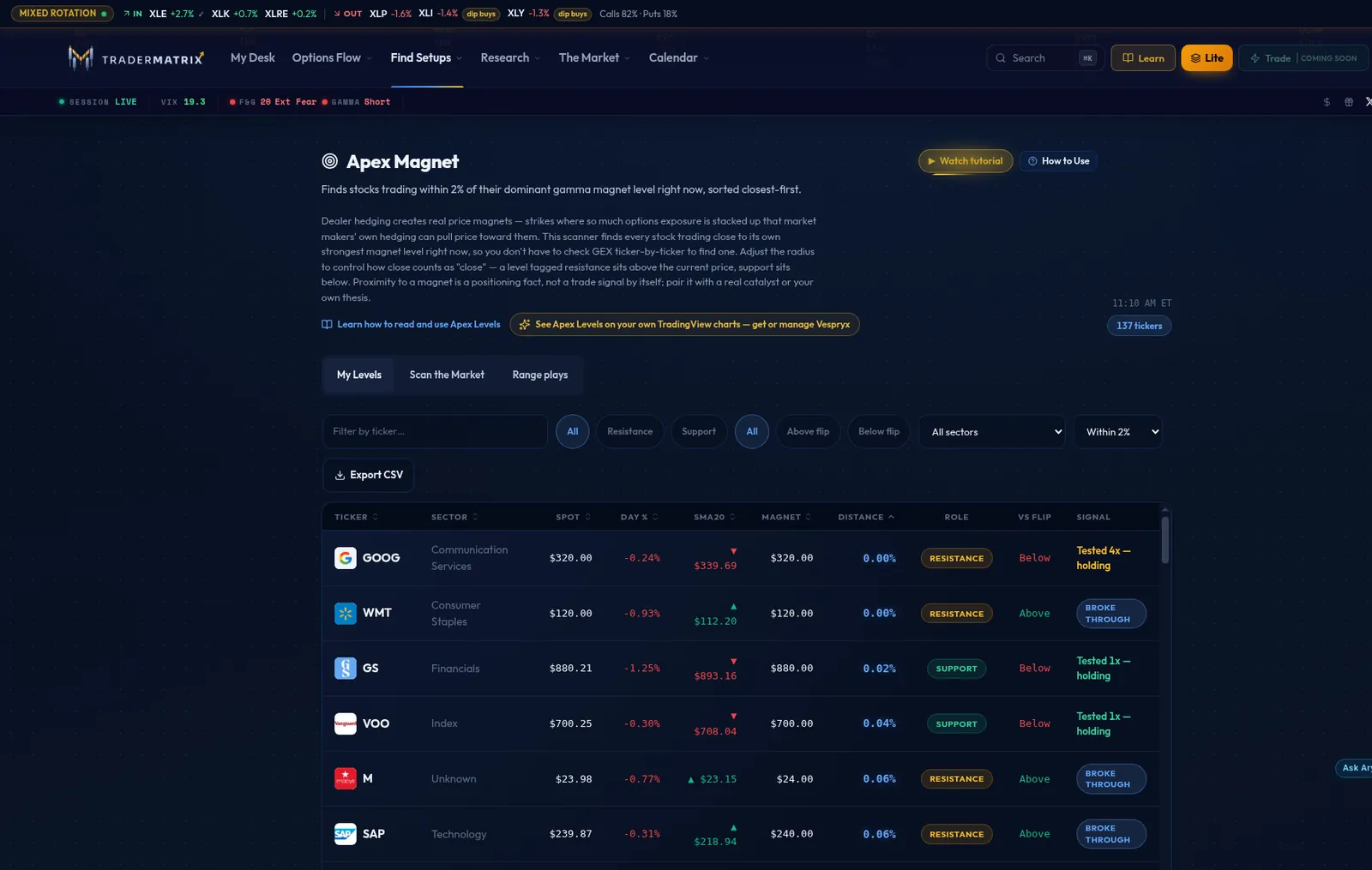
- Apex Magnet (11:10 ET): stocks within 2% of their dominant gamma magnet, sorted closest first. VOO sat at $700.25 on its $700 magnet, tagged as support and "Tested 1x, holding".
- Fear & Greed: the CNN gauge inside Market Health read 21, Extreme Fear in the early afternoon.
A few things to know from the session. Some boards were still showing the previous session's scans when we checked during the morning. The daily Breaking Out list, for example, is built after the close (4:15 PM ET), so during the day it shows the prior session's signals. Check the scan time on each board; it's always shown. We've passed notes to the team on making the timing clearer. The GEX calculator covers indexes, ETFs and futures; for individual stocks, use the Apex levels on each ticker's page.
Who it's for: TraderMatrix vs Trade Ideas
Our reviewer's view: "This system is really good for new traders. It doesn't take a lot of configuration." That's the clearest difference from Trade Ideas, which is advanced scanning software built for traders who know exactly what they want to build.
| TraderMatrix | Trade Ideas | |
|---|---|---|
| Approach | Ready-made screeners and flow views, with context explained in plain English | Build-your-own real-time scans and alerts across the whole US market, with an AI Assistant to help build them |
| Set-up | Works out of the box; the Learn paths pick your tools | Most powerful once you configure it for your style |
| Options flow and GEX | Core of the product | Not the focus |
| Training | Lite/Pro tours, Learn paths and quiz, glossary, YouTube | Extensive training and a community, aimed at active traders |
| Price | $49.99/month | From $89/month billed annually |
Pick TraderMatrix if you want to understand the day quickly (where the flow is going, where dealers are positioned, what the market's health looks like) without building scans. Pick Trade Ideas if you're an advanced trader who wants to design and backtest your own scans and alerts. Both are good tools; they're aimed at different traders.
Pricing
Checked on tradermatrix.pro on 23 Oct 2026:
| Plan | Price | What you get |
|---|---|---|
| Free | $0 | Basic flow access; free tools such as the Options Profit Calculator (no account needed), News Wire and the Day Trading Watch List |
| Premium (bundle) | $49.99/month | "Every tool on the platform, no feature gates", plus Vespryx, the TradingView indicator suite and the Broker & Journal Connection at no extra cost. 7-day free trial (card required). The page says the price is "locked for life" while you keep the plan |
| Vespryx alone | $34.99/month | The TradingView GEX overlay without the platform. Existing Premium members can add it for $9.99/month |
| Indicator suite alone | $7.99/month | The TradingView indicators on their own |
| Discord Flow Bot | $99/month per server | 8 alert types and 26 slash commands for a whole server; 14-day trial with no card |
The Broker & Journal Connection (read-only: trades sync into your journal, positions and Wheel Tracker) is listed at $9.99 on its own, but it's currently included in the $49.99 bundle.
Pros & Cons
Pros
- + The Heat Score puts momentum, RVOL and net options premium into one number per ticker, rescored every minute
- + Ready-made screeners that are useful from day one, including the Breaking Out Triangle and Gap Continuation
- + GEX levels and Tomorrow's Map explained in plain English, plus Apex levels for single stocks
- + A Wheel Tracker that starts from shares you already own and suggests covered calls
- + Market Health: a top-down macro dashboard that explains every number
- + Strong onboarding: Lite and Pro tours, Learn paths and a quiz, a glossary and YouTube tutorials
- + Everything for $49.99 a month, with Vespryx and the TradingView indicators included
Cons
- - No trade signals: no entries, stops or targets (by design), and the Trade button is still "coming soon"
- - The GEX calculator covers indexes, ETFs and futures, not single stocks
- - Some boards were still showing the previous session's scans during our test
- - A young product: a few pages and numbers still have rough edges, and the team is actively fixing them
Rating Breakdown
4.2
★★★★☆
Overall Rating
ease of use 4.5
features 4.5
value 4.6
support 4.1
reliability 3.4
The bottom line
TraderMatrix does what our reviewer said it does: it answers a lot of the questions a trader has during the day. Where is the options money going? Where are dealers positioned? Is this likely to be a trend day or a chop day? Is a name heating up on volume and flow together? Its best ideas, the Heat Score, the Breaking Out Triangle, the Wheel Tracker and Market Health, are fresh for a retail platform (the triangle scanner is one our reviewer had been looking for for a long time), and the training around them makes it one of the friendlier places to learn options flow. Treat it as your research and context desk rather than a signal service, and it's very good value at $49.99 a month.
FAQ
How much does TraderMatrix cost?
Premium is $49.99 a month, with Vespryx, the TradingView indicator suite and the broker connection currently included. There's a 7-day free trial. The Discord Flow Bot is $99 a month per server.
Is TraderMatrix free?
There's a free tier with basic flow access, and some tools, such as the Options Profit Calculator, News Wire and Day Trading Watch List, are free. The full platform needs Premium.
Does TraderMatrix give trade signals?
No. It provides flow, GEX levels, scanners and market context, but not entries, stops or targets. A "Trade" feature is marked coming soon.
Is TraderMatrix good for beginners?
Yes. It needs little configuration, and the Lite view, Learn paths, quiz, glossary and video tutorials are built for newer traders.
Does TraderMatrix work with TradingView?
Yes. Vespryx (a Chrome extension) draws GEX and flow levels on TradingView charts, and there's a TradingView indicator suite. Both are included with Premium at the moment.
Related Tools
FlowAlgo
★★★★☆ 4.3
Premium institutional-grade options flow scanner with dark pool prints, real-time alerts, and fast data delivery.
From $99/mo
optionsstocks
Unusual Whales
★★★★☆ 4.2
Options flow, dark pool and market data platform popular with retail options traders.
From $37/mo
options
Trade Ideas
★★★★½ 4.6
Advanced real-time stock scanning and AI-assisted alerts for traders who want to build their own scans.
From $89/mo
stocksscanners
Parts of TradingToolsHub, especially comparison summaries, category overviews, and long-form guide sections, are drafted with the assistance of AI tools. Every published piece is reviewed by an editor before it goes live. Ratings, pricing, and product-specific claims are cross-checked against the vendor's own site and our reviewer's hands-on experience. AI Disclosure
Full transparency — a few of the links on this page are affiliate. We earn a commission on qualifying purchases, at no additional cost to you.